PH Bank — rebuilt and optimized
A full rebuild of the Isla Philippines banking system — new interface, multiple accounts, PIN security, transfers, and a complete transaction history.
Developer Announcement
Following the V2 registration system, here's your next sneak peek — PH Bank has been completely
rebuilt from the ground up. Faster, cleaner, and far more capable than the old system.
Here's a walkthrough of what's changed, section by section.
Opening an account
New accounts are issued instantly at the counter with a card number and a default PIN. You're no longer limited to a single account — open as many as you can justify, and set whichever you like as primary.
- Instant issue with card number and default PIN
- Change the default PIN immediately after your first login
- Additional accounts cost $2,500 for each account you already hold
A secured terminal
Your PIN is entered on a dedicated keypad rather than typed into a text box — no PIN sitting in your chat box, and nothing for a shoulder-surfer to read off your screen.
Your account at a glance
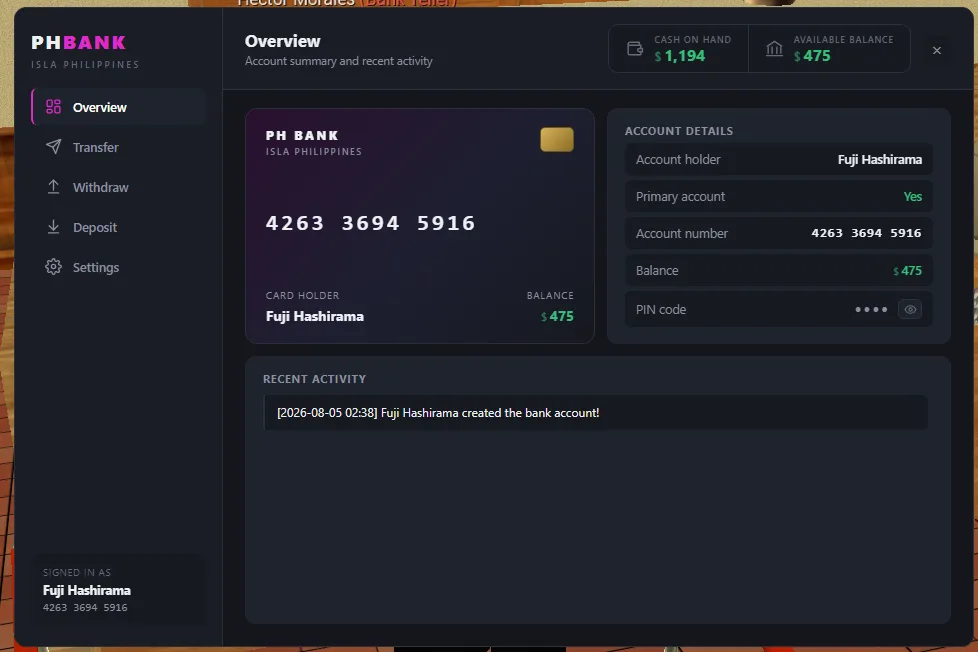
The Overview tab is the new home screen. Your virtual debit card, account number and balance sit together in one place, and your cash on hand and available balance stay pinned to the header no matter which tab you're on — so you always know where you stand before you commit to a transaction.
- Virtual debit card with a unique 12-digit account number
- Account holder, primary status and balance at a glance
- PIN kept hidden behind a reveal toggle
- Recent activity log for every account event
Deposits, fully itemized
Move cash into your account with quick buttons for the common amounts, or type any figure you like. Every deposit is itemized — cash paid in, amount credited, the fee taken and the balance you were left with — so nothing is ever a mystery.
- Quick amounts for $100, $500, $1,000 and $5,000
- 5% service fee, shown before you confirm
- Timestamped deposit history you can scroll back through
Cash out on your terms
Taking cash back out works the same way, and keeps its own separate history — how much left the account, what you received as cash, the fee taken, and the balance you were left with.
- Same quick amounts and 5% service fee
- Full breakdown written to your withdrawal history
Send money to anyone
Transfer funds straight to another player's account number, with a reference and a message attached so they know exactly what it's for. No more meeting up in person just to hand over cash.
- Send to any 12-digit account number
- Attach a reference and a message to every transfer
- 10% transfer fee, deducted from the amount received
Security you control
Every change to your PIN is recorded, so if someone has been in your account you'll see it. Settings is also where you manage the account itself.
- Change your PIN at any time, with a full change history
- Set any account as your primary
- Open additional accounts, or permanently close one