The new Map & Radar
A brand-new F11 world map and minimap for Isla Philippines — postal codes, GPS routing, a 28-category legend, and a radar that loses signal indoors.
Developer Announcement
The next sneak peek is here — a completely new map and radar system for
Isla Philippines. Postal codes across the whole map, GPS routing, a filterable
legend, and a radar that behaves like real hardware rather than a game overlay.
Here's the full tour.
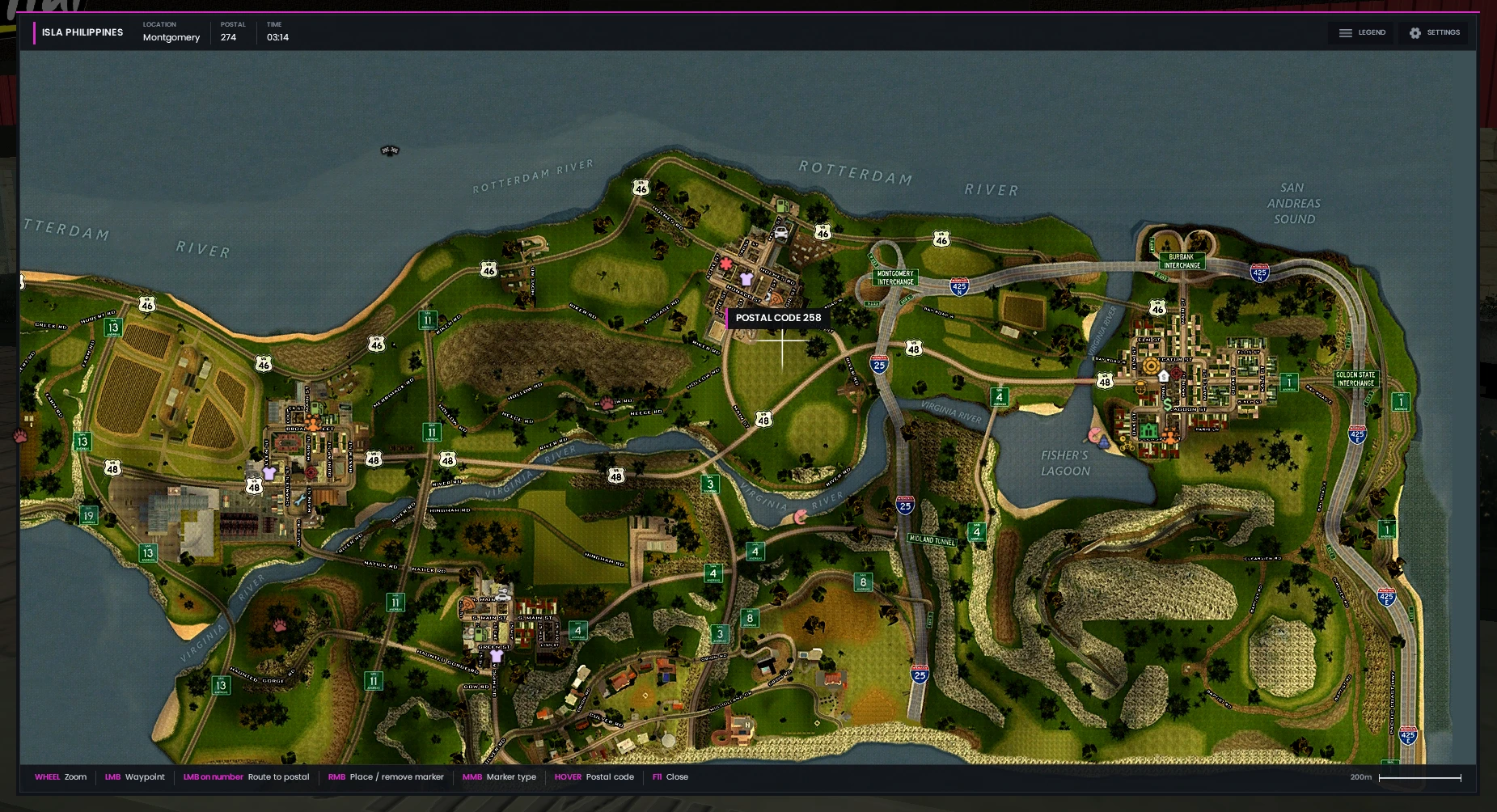
A world map worth opening
Press F11 for a full-screen map with an interface built from scratch for Isla Philippines. Your current location, postal code and the in-game time sit along the top, and a scale bar keeps distances honest.
- Scroll to zoom, with optional smooth easing between levels
- Location, postal code and in-game time always on show
- Distance scale so you can judge a trip before you take it
Postal codes, everywhere
The whole map is divided into numbered postal zones. Hover anywhere to read the postal under your cursor, or turn on the postal grid to see every number laid over the map at once — so directions become a single number instead of a paragraph.
- Hover any spot to read its postal code
- Toggle the full postal grid on or off
- Tell someone "280" instead of describing a junction
GPS routing to any postal
Click a postal number and the GPS plots a route straight to it, drawn right across the map. Drop a waypoint anywhere you like and follow it from there.
- Left click to set a waypoint, or click a number to route to that postal
- Right click to place and remove your own markers
- Middle click to change marker type
- Optional spoken turn-by-turn directions
Find anything on the map
A legend of 28 categories covers everything worth driving to — from Ammu-Nation and banks to fishing spots, hunting grounds and the casino. Click any row to filter the map down to just that category.
- Shops, services, jobs and activities all catalogued
- Click a row to show or hide that category
- Hide everything at once for a clean map
Make it yours
Seven settings let you tune the map and radar to how you actually play. Everything saves automatically — set it once and forget it.
- Rotating radar that turns with your camera
- Edge blips that pin off-screen markers to the radar rim
- 3D blips drawn out in the world itself
- GPS voice for spoken directions
- GPS realism, which makes you lose signal in tunnels and interiors
A radar that actually tells you something
The minimap shows your district, your postal code and your compass heading at a glance — enough to orient yourself without ever opening the full map.
- District name and live postal code
- Compass heading with bearing in degrees
- Blips for everything nearby
GPS realism: lose the signal
This is the part we're most pleased with. With GPS realism enabled, your signal behaves like a real one — step into a building or under heavy cover and the map goes dark until you find open sky again.
- Signal drops indoors, in tunnels and under obstruction
- The map reports why, where you were last seen, and for how long
- Move back into the open to reacquire
It tells you why
Losing signal never leaves you guessing. Whether you're indoors or simply have no clear line of sight to the sky, the map says which — and your radar shows the same status in miniature.
- Separate states for indoors and obstructed
- Last known location and postal kept on screen
- A running count of how long you've been offline